PIXNET Logo登入

CCH的部落格

跳到主文

歡迎光臨CCH在痞客邦的小天地

部落格全站分類:數位生活

  • 相簿
  • 部落格
  • 留言
  • 名片
  • 12月 20 週一 201017:17
  • [技術筆記](CSS) word-wrap: 讓英文字自動斷行

常遇到在固定寬度的TABLE中顯示URL,但是URL太長因此超出TABLE預設的寬度,不會自動換行,可以用以下的CSS STYLE解決:
word-wrap: break-word;
word-break: break-all;
說明:
1. word-wrap: 超過寬度時是否要換行
(繼續閱讀...)
文章標籤

CCH 發表在 痞客邦 留言(0) 人氣(30)

  • 個人分類:技術筆記
▲top
  • 12月 16 週四 201018:34
  • 30+ Best Magazine Style Blogspot Blogger Templates of 2010

30+ Best Magazine Style Blogspot Blogger Templates of 2010
(繼續閱讀...)
文章標籤

CCH 發表在 痞客邦 留言(0) 人氣(0)

  • 個人分類:Blog
▲top
  • 12月 15 週三 201012:20
  • [技術筆記] 在windows server 2008的工作排程中執行IE開啟網頁

源起
在開發網路程式(ASP、ASP.NET...等)時,有些功能必須重複執行,通常會使用排程來設定這樣的工作。
但是如果程式設計師只有網路程式的經驗,不會寫WIN-FORM程式,好像也沒關係,寫成WEB版再設定以IE開啟即可。
以前的解決方案
指令如下:
(繼續閱讀...)
文章標籤

CCH 發表在 痞客邦 留言(0) 人氣(38)

  • 個人分類:技術筆記
▲top
  • 12月 06 週一 201015:40
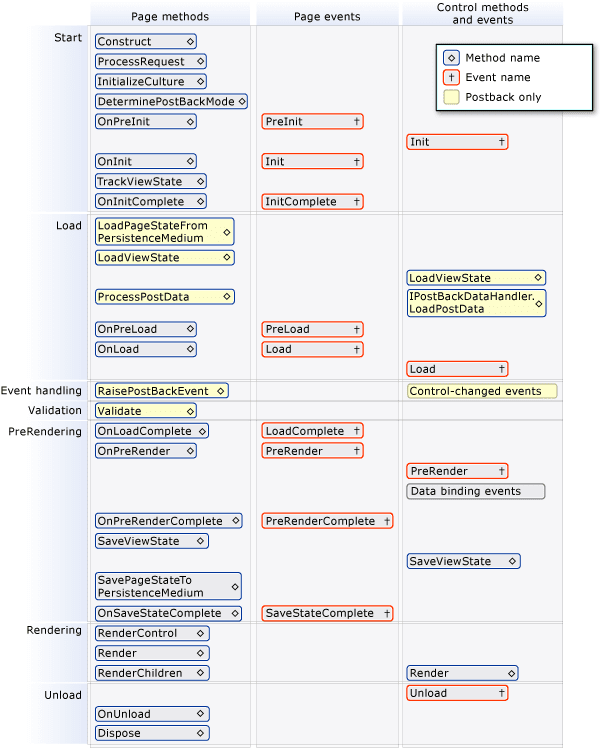
  • [技術筆記] ASP.NET 內建event執行順序


在ASP.NET程式中,提供許多內建的EVENT,可以用來處理一些功能,如果只有單獨一個PAGE,就比較單純。但是當導入Master Page以及User Control後,通常讓程式設計師無所適從,在此整理相關訊息:
單獨一個PAGE的狀況:
1. PreInit
2. Init
3. PreLoad
(繼續閱讀...)
文章標籤

CCH 發表在 痞客邦 留言(0) 人氣(110)

  • 個人分類:技術筆記
▲top
  • 10月 19 週二 201010:11
  • [技術通報] KB2360131更新會造成網站顯示不正常

微軟於2010/10/14發佈的IE KB2360131更新,防止了跨SITE的CSS參考(cross site css),如果網頁中有跨SITE的CSS參考,IE將不會套用該CSS,因此會造成顯示不正確(該有的字、圖都會出現,但是排版不正確)
KB2360131更新主要防止在CSS中的URL屬性(例如background-image),會被導入不安全的頁面或是程式,因此加上此防護。請參考以下網址的SAMPLE:
http://ajaxian.com/archives/xsstc-cross-site-scripting-through-css-data
如何修改網頁以避免不正常:
簡單來說就是拿掉跨SITE的CSS參考
1. 將其他SITE的CSS複製一份至本機,然後修改CSS參考URL至本機
2. IIS中設定跨SITE路徑參考至原來的CSS位置,同樣修改CSS參考URL至本機的路徑
方法一較簡單,但是壞處是要維護兩套CSS
方法二較複雜,也可能無法做到,但是好處是不需要維護兩套CSS
以上給大家參考
(繼續閱讀...)
文章標籤

CCH 發表在 痞客邦 留言(0) 人氣(3)

  • 個人分類:網路安全
▲top
  • 2月 25 週四 201015:02
  • Visual Studio 連線至遠端WEB網站的方法

預先作業:
遠端SERVER要安裝FrontPage Server Extensions控制台-->新增移除程式新增WINDOWS元件Application Server-->IIS-->FrontPage 2002 Server Extensions站台要配置FrontPage Server Extensions至IIS點選站台-->右鍵-->所有工作-->配置FrontPage Server Extensions連線至遠端WEB站台:
(繼續閱讀...)
文章標籤

CCH 發表在 痞客邦 留言(0) 人氣(24)

  • 個人分類:ASP.Net
▲top
  • 11月 05 週四 200913:56
  • 客製化MOSS ALERT的EMAIL內容

I am trying to customize the alert notifications for a task list. I got to remove the “Description” field content and the “Title” field content from the email notifications that is being sent when a task is changed or assigned to somebody. I did the following steps for accomplishing the same:
1. I took a copy of the alerttemplates.xml and copied c:\temp folder in the server.
2. I added the field name “Description” in both the tags “ImmediateNotificationExcludedFields” and “DigestNotificationExcludedFields” under the SPAlertTemplateType.Tasks.
ID;Author;Title;Description;Editor;Modified_x0020_By;Created_x0020_By;_UIVersionString;ContentType;TaskGroup;IsCurrent;Attachments;NumComments;
(繼續閱讀...)
文章標籤

CCH 發表在 痞客邦 留言(0) 人氣(12)

  • 個人分類:MOSS
▲top
  • 11月 05 週四 200912:49
  • Sharepoint Server 2007(MOSS) Alert Email Troubleshoting--Part II

其他詳細步驟
1. Open the command window, go to the BIN folder and get the property of
Alerts-enabled to make sure the alerts are enabled for the timer service:
C:\Program Files\Common Files\Microsoft Shared\web server
extensions\12\BIN>stsadm.exe -o getproperty -url -pn
alerts-enabled
The expected output is

2. Open the MOSS Central Administration page, click Operations--Timer Job Status,
make sure the following two jobs are showing "success" and 100%
Change Log
Immediate Alerts
3. Make sure the account running the SharePoint Timer service is the account which has the administrator Full Control permission over the site and the full permission over the content database. Restart the timer service if required.
4. 檢查資料庫:
在content db中,timerlock
Open SQL Query Analyzer, connect to the content database of problematic site.
Run the following query and copy the result out.
Select * from timerlock
Let me know the server name seen in the LockedBy column is the same one of this SPS
server. This server is responsible for processing the timer service.
1. Run the following query against the content database of problematic site
select * from eventcache where EventData is not null
(找出尚未送出的ALERT,若完成寄送,EventData 會被設為null)
This will out put all fo the subscritions which have not been processed yet. We can see if there are some alerts which are not processed
2. select * from eventlog where ListID = 'xxx'
()
You can get the ListID from the EventCache table by running
Select * from EventCache and check the documents which correspond to the problematic list.
3. If you cannot find any record in the step 1, please perform the following tests:
Put filemon on the SPS server and we can see if the Timer service picks up the alert template during the whole process.
a. Upload a new document to the document library which is supposed to have the alerts. Begin running the filemon.
b. Run
select * from eventcache order by EventTime DESC
Check if the latest log is the one corresponds to your uploaded document. Make sure the EventData and ACL columns are not NULL.
c. After 5 minutes or more minutes, check the EventCache table again to see if the EventData and ACL columns are NULLed.
d. If so, stop filemon after the EventData and ACL columns are NULLed
(繼續閱讀...)
文章標籤

CCH 發表在 痞客邦 留言(0) 人氣(3)

  • 個人分類:MOSS
▲top
  • 11月 05 週四 200912:34
  • Sharepoint Server 2007(MOSS) Alert Email Troubleshoting

0. 先檢查/解決MOSS本身傳送EMAIL的設定
至MOSS管理中心 > 作業 > 外寄電子郵件設定 設定相關資料
測試: 先找一個文件庫或清單,新增一個ALERT,若能收到設定完成的通知信,表示MOSS本身傳送EMAIL設定OK
以下針對當異動/新增發生時,無法收到ALERT EMAIL的狀況:
1. 先察看Timer Job
(繼續閱讀...)
文章標籤

CCH 發表在 痞客邦 留言(0) 人氣(0)

  • 個人分類:MOSS
▲top
  • 10月 29 週四 200915:14
  • How to Query SQL Database with a MOSS 2007 WebPart

There are a lot of articles out there that will show you how to create a basic WebPart in MOSS 2007 but I haven't yet seen one that will show you how to really do anything with that WebPart. I wanted to create a simple walk-through that will at least give you the foundation that you need to create a WebPart with some controls and connect to a SQL Database to retrieve some data and add it to a list.
As many of you have undoubtedly figured out by now, there is no way to visually design a WebPart in Visual Studio. For those of you who have written custom controls we would use the same technique to programmatically add the controls to the page at run time. In this example I will create WebPart that consists of a Button used to refresh that data in a SharePoint List and a Label to display a message to the user. The purpose of this WebPart is to populate a SharePoint list with items that are running low in our inventory.
Step 1: Creating the U.I.
In order to create the UI of our WebPart we have to add our controls to the page at run time. This is done by Overriding the CreateChildControls method of the WebPart class. You then use the Controls.Add() method to add new controls to the page. You also need to create the Event Handlers. The resulting code would look like this.
protected override void CreateChildControls()
(繼續閱讀...)
文章標籤

CCH 發表在 痞客邦 留言(0) 人氣(3)

  • 個人分類:Webpart
▲top
12...4»

個人資訊

CCH
暱稱:
CCH
分類:
數位生活
好友:
累積中
地區:

熱門文章

  • (138)程式版本管理的輔助工具--WinMerge

文章分類

  • Blog (1)
  • PDF (1)
  • OWC (1)
  • Mobile Device (1)
  • ASP (1)
  • Rational (2)
  • Version Control (3)
  • Software Engineering (3)
  • plug-in (1)
  • MOSS Development (2)
  • Report tools (1)
  • Development (1)
  • Sharepoint (1)
  • Webpart (2)
  • MOSS (3)
  • 網路安全 (1)
  • ASP.Net (1)
  • 技術筆記 (10)
  • 未分類文章 (1)

最新文章

  • [技術筆記](CSS) word-wrap: 讓英文字自動斷行
  • 30+ Best Magazine Style Blogspot Blogger Templates of 2010
  • [技術筆記] 在windows server 2008的工作排程中執行IE開啟網頁
  • [技術筆記] ASP.NET 內建event執行順序
  • [技術通報] KB2360131更新會造成網站顯示不正常
  • Visual Studio 連線至遠端WEB網站的方法
  • 客製化MOSS ALERT的EMAIL內容
  • Sharepoint Server 2007(MOSS) Alert Email Troubleshoting--Part II
  • Sharepoint Server 2007(MOSS) Alert Email Troubleshoting
  • How to Query SQL Database with a MOSS 2007 WebPart

文章精選

文章搜尋

誰來我家

參觀人氣

  • 本日人氣:
  • 累積人氣: